
Exploring Azure Resource Usage and Ownership with Azure Resource Graph
Azure Resource Graph (ARG) is one of those underrated tools in the Azure portal. If you’re managing multiple subscriptions or large environments, ARG is a lifesaver when it comes to quickly querying your Azure estate at scale. It’s built for performance and provides fast and efficient access to your resource metadata.
In this post, I’ll share two practical Azure Resource Graph queries I’ve used recently—one to visualize resource distribution by region and another to identify infrastructure managed by Terraform. Both are great starting points for gaining visibility into your cloud footprint.
And if you’re practicing FinOps, ARG can be a powerful ally for understanding resource allocation, identifying unused assets, and making data-driven cost optimization decisions across teams.
 |
|---|
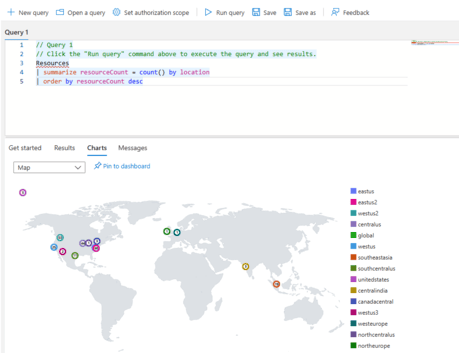
Query 1: Count of Azure Resources by Region
This query helps you understand the geographic distribution of your cloud resources:
Resources
| summarize resourceCount = count() by location
| order by resourceCount desc
Query 2: Identify Resources Managed by Terraform
When managing infrastructure with Terraform, it’s common practice to tag resources for clarity and lifecycle tracking. The following ARG query filters resources that include a specific tag indicating they are managed by Terraform:
Resources
| where tags["ManagedBy"] == "Terraform"
| project name, type, location, resourceGroup, subscriptionId, tags
If you’re looking to expand your library of Azure Resource Graph examples, these community posts are excellent resources:
- Starter Resource Graph query samples
- Azure Resource Graph Examples Repo by Billy York
- Querying Tags in Azure Resource Graph by Sarah Lean
- Azure Resource Graph Community Samples by Wilfried Woivre
These are great starting points whether you’re just getting familiar with Kusto Query Language (KQL) or looking to build out automated inventory and governance tooling.